
翻訳履歴はありますか?
ConveyThis doesn’t keep a full log of every change. For each text on your site, it keeps two versions: the automatic (machine) translation and your latest edit. You can see when each text was last changed and switch back to the automatic translation at any time.
How do I see which translations were changed?
- 次にログインします: ConveyThis ダッシュボード、次を開きます: Edit Translations in the left menu and pick your domain.
- 次をクリックします: テキストエディター next to the page you want to check.
- を開きます Sort by メニューから USER Translations to see only the texts you or your team edited.
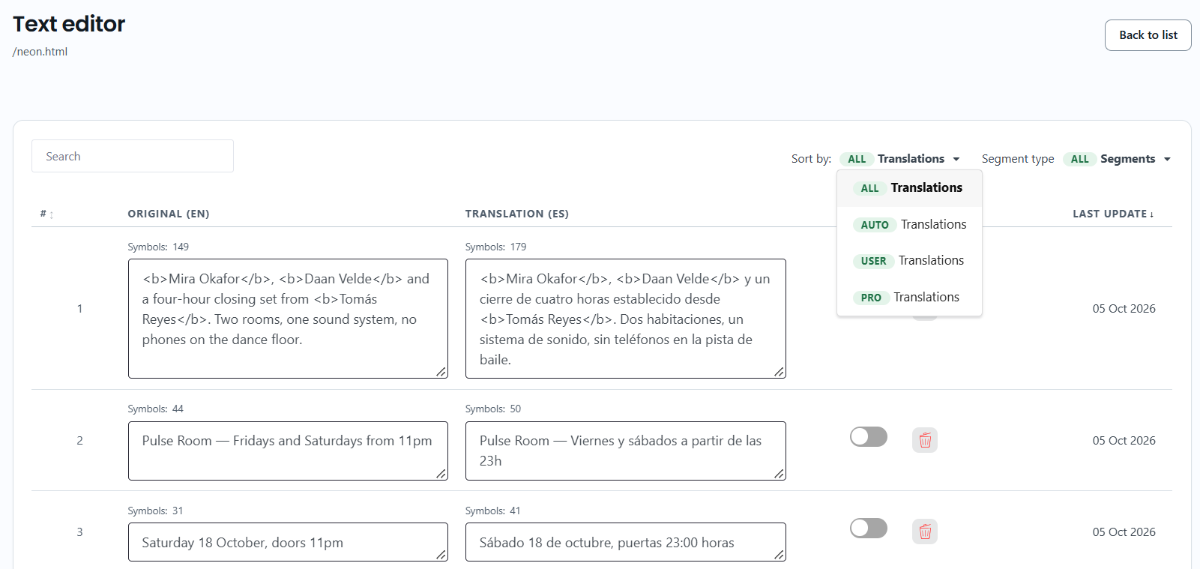
Sort by menu has four options:
- ALL: every text on the page.
- AUTO: texts that use the automatic translation.
- USER: texts that use your own edit.
- PRO: texts that use a professional translation.
Last update column shows the date each text was last translated or changed. Click the column title to sort by it.
How do I go back to the automatic translation?
Each text in the Text Editor has a switch next to the translation:
- オン: the text uses your edit.
- Off: the text uses the automatic translation.
Turn the switch off to bring back the automatic translation. The change is saved right away. Your edit isn’t deleted, so you can turn the switch on again to use it.
ConveyThis only keeps your latest edit. If you change a translation again, the earlier version is replaced.
How can I keep a copy of my translations?
To keep earlier versions, export your translations before you make big changes. Go to ドメイン、次を開きます: 翻訳 (対象のドメイン)。次を選択します: CSV または TMX. Export is available on the Pro+ plan and higher. You can import the file later to bring the translations back. See Import and export translations.