
Comment puis-je empêcher la traduction de certaines parties de mon site Web ?
ConveyThis translates everything on your website by default. You can keep parts of it in the original language in three ways:
- Exclude elements: keep a block of a page untranslated, such as a header, a price table or a code sample.
- Exclude pages: keep whole pages untranslated, such as your privacy policy.
- Use a whitelist: translate only the pages you choose, and nothing else.
All three are available on paid plans. They aren’t included in the Free plan.
Comment exclure une partie d'une page ?
Exclude an element by its id ou class. The element and everything inside it stay in the original language, on every page where it appears.
- Connectez-vous à votre tableau de bord ConveyThis et ouvrez Domaines.
- Sur votre site, ouvrez le menu Personnaliser et choisissez Excluded ids/classes. The Exclusions page opens on the Elements par défaut.
- Sous Add element exclusion, choisissez id ou class.
- Type the name exactly as it appears in your HTML, without
#ou.. For example, for<div class="site-footer">typesite-footer. - Cliquez sur Add exclusion.
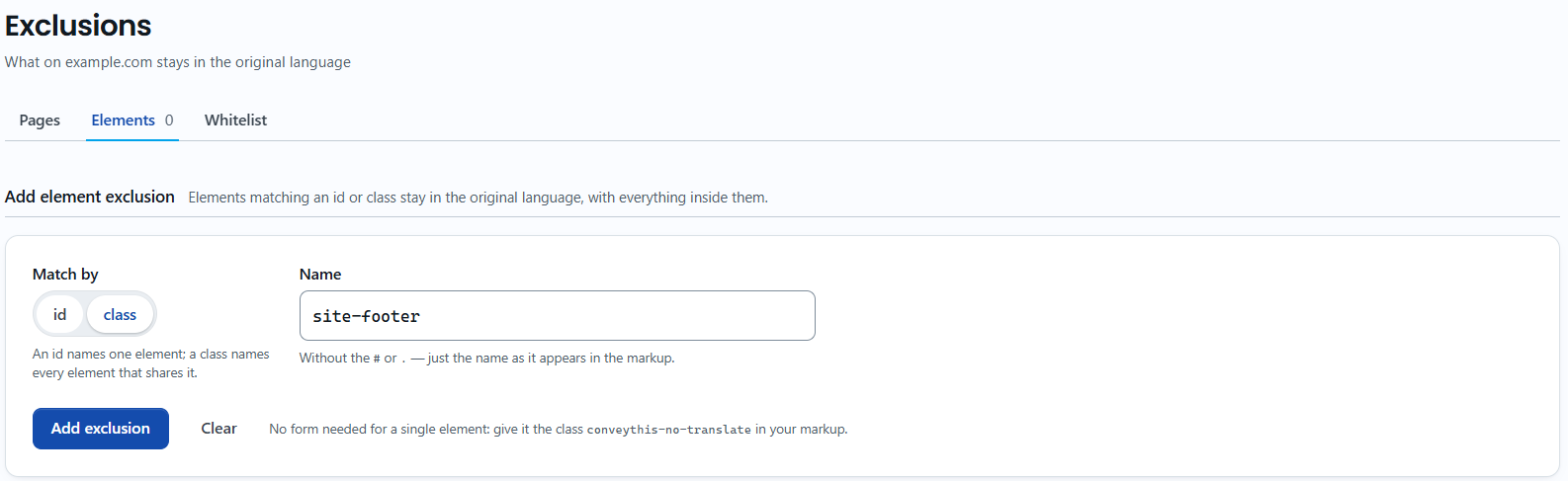
Un id names one element. A class names every element that shares it, so one class rule can cover the same block on all your pages.
Can I exclude elements in WordPress, Shopify or Joomla?
Yes. The ConveyThis plugins have the same option, and the rules you add there are saved to your ConveyThis account, so they also appear in your dashboard.
- WordPress: dans l'administration WordPress, ouvrez ConveyThis et allez dans l'onglet Pages exclues puis, dans la section Exclusion div Ids, cliquez sur Add more ids, or under Exclusion div Classes, cliquez sur Add more classes. Enter the name and click Save settings.
- Shopify: dans l'administration Shopify, ouvrez l'application ConveyThis et allez dans Whitelist & Exclusions. Dans la section Element Exclusions, add the id or class and click Save Exclusions.
- Joomla: dans l'administration Joomla, ouvrez Components → ConveyThis et allez dans l'onglet Pages exclues puis, dans la section Parts of a page, add the id or class to Elements to leave untranslated et enregistrez.
Can I exclude text without the dashboard?
Yes. Add the class conveythis-no-translate to any element in your HTML:
<p class="conveythis-no-translate">This text will not be translated.</p>The common notranslate class works the same way.
ConveyThis also leaves some things untranslated on its own. On Shopify, prices and the payment buttons stay as they are. On WordPress, the admin bar and code blocks aren’t translated.
How do I exclude whole pages?
Accédez à Domaines, ouvrez Personnaliser pour votre site et choisissez Pages exclues. Add a rule that matches the page address, for example URL starts with /blog to keep every blog post in the original language.
For all four match options and examples, see Comment exclure des pages de la traduction ?
How do I translate only some pages?
Use the whitelist. When it’s on, ConveyThis translates only the pages on the list, and everything else stays in the original language. It’s useful when you roll out translation page by page.
Accédez à Domaines, ouvrez Personnaliser pour votre site et choisissez Liste blanche. Turn the whitelist on for your website, then click Edit pages to choose the pages to translate. In the Shopify app, you’ll find the whitelist on the Whitelist & Exclusions page, under Translate ONLY whitelisted pages.
What about single words, like my brand name?
Excluding an element keeps the whole block untranslated. To keep only one word or phrase untranslated wherever it appears, such as your brand name, use a Glossaire rule with Ne traduisez pas.
When do changes show?
Exclusions take effect the next time a page is loaded. If you still see a translation, clear your website’s cache and check the page in a private window. See Pourquoi mes modifications de traduction ne s'affichent-elles pas sur mon site Web ?