
Могу ли я настроить переведенные URL-адреса?
You choose how the addresses of your translated pages look. This matters for search engines: only some options give each language its own address that Google can find and show in search results.
Which address structures can I choose?
Here is how the Spanish version of example.com/about looks with each option:
| Вариант | Spanish page address | Own address per language | Что вам нужно |
|---|---|---|---|
| Without parameter (default) | example.com/about | Нет | Nothing |
| With parameter | example.com/about?locale=es | Да | Nothing |
| Поддомен | es.example.com/about | Yes, best for SEO | Business plan or higher, one DNS record per language |
| Подкаталог | example.com/es/about | Yes, best for SEO | Business plan or higher, one DNS record for your domain |
- Without parameter: the address stays the same and the language changes on the page. The visitor’s choice is remembered in their browser. Search engines see only your original language.
- With parameter: the language is added to the end of the address. You can share a link to a translated page.
- Поддомен и Подкаталог: every language has its own address, like a separate website. These are the best options if you want your translated pages to appear in Google. See Sub-domain or sub-directory for how to choose.
How do I change the address structure?
- Перейдите в Домены через ConveyThis панель управления, open the Настройки и выберите Настройки.
- Expand Advanced and find Url.
- Choose an option. Your changes are saved automatically.
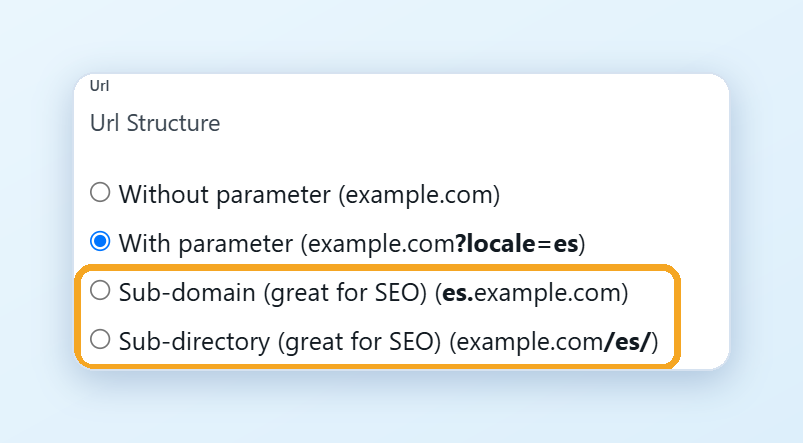
Если вы выберете Поддомен или Подкаталог, the DNS records you need appear right below:
- Поддомен: add one CNAME record for each language, for example эс for Spanish. See Add CNAME records in your DNS manager.
- Подкаталог: add the A record shown on the page for your domain.
Add the records where your domain is managed (for example, your domain registrar or Cloudflare), then click Test DNS connection. DNS changes can take up to 24 hours to work.
With these two options, your translated pages are served through ConveyThis.
Which platforms support sub-domains and sub-directories?
- Wix, Bubble, Framer and Lovable: neither option is available yet.
- Shopify: sub-domains only.
- WordPress: the plugin creates sub-directories (
example.com/es/) by itself, with no DNS records to add. See below. - Other websites: both options.
WordPress
The ConveyThis plugin uses sub-directories by default, for example example.com/es/about. You don’t need to change anything in the dashboard or your DNS.
Can I translate the page names in the address?
On WordPress, yes. In your WordPress admin, open ConveyThis, go to Extended settings and set Translate URLs → Да. The page names in your addresses are then translated too:
- Original:
example.com/about-us - Spanish:
example.com/es/sobre-nosotros - French:
example.com/fr/a-propos
This feature is in beta. It may not work on pages with non-Latin addresses, such as Cyrillic or Chinese. After you turn it on, check your pages and ask Google Search Console to crawl your website again.