



Shopify can already serve every page of a store under a language folder such as yourstore.com/es/, with hreflang tags and a checkout in Spanish. What it doesn’t do is translate your products, collections and pages. Until now, ConveyThis couldn’t use those folders either: on Shopify, the Sub-directory option wasn’t available, and translated URLs meant a language subdomain set up through DNS.
With this release, Sub-directory mode in the ConveyThis Shopify app runs on Shopify’s own languages. Shopify serves yourstore.com/es/ on your existing domain and generates the hreflang tags. ConveyThis translates your content and copies the translations into Shopify, so product, collection and page text is already in Spanish in the HTML Shopify sends.
For a merchant, that means language URLs that live on the domain your store already uses, without touching DNS and without putting a proxy between your visitors and Shopify. The translations you made in Translate & Adapt stay where they are. Sub-directory is available on the Business plan or higher.
Translated pages in the HTML
Product titles, descriptions, collections and SEO fields arrive translated in the page Shopify sends, with Shopify's own hreflang tags.
No DNS, no proxy
Pick Sub-directory in the app and enable your languages. Your domain and Shopify hosting stay exactly as they are.
One place to edit
Edit a translation in ConveyThis and Shopify serves it within about 15 minutes. Translate & Adapt translations stay.
Menus, theme and app text and reviews are still translated on the page by the ConveyThis widget, so visitors see the whole page in their language.
What changed for Shopify stores
| Before this update | With this update | |
|---|---|---|
| URL options on Shopify | Same URL, ?locale=es or a sub-domain such as es.yourstore.com | All of these, plus Sub-directory: yourstore.com/es/ |
| DNS change | Sub-domain needs CNAME records | Sub-domain still does. Sub-directory needs none |
| Translated text in the page HTML | Added in the browser by the ConveyThis widget | With Sub-directory, Shopify sends products, collections, pages and blog articles already translated |
The app now works with the languages your store already has in Shopify. It enables and publishes the languages you translate with ConveyThis and shows which ones are assigned to your domain. On a /es/ page, the ConveyThis widget translates your content while skipping any text Shopify has already translated. The app also copies your existing ConveyThis translations into Shopify through the Translations API, the same storage Translate & Adapt uses, so Shopify serves them as part of the page.
Here is what a product URL looks like:
yourstore.com/products/blue-shirt       (primary language)
yourstore.com/es/products/blue-shirt    (Spanish)
The /es/ folder comes from Shopify. The handle blue-shirt stays in your primary language, because ConveyThis doesn’t copy URL handles into Shopify.
How it works
Each part of a language page is handled by the system that is best placed to do it: Shopify language URL → ConveyThis translation → Translations API → translated Shopify HTML.
Shopify serves the language URL. When Spanish is published and assigned to your domain, Shopify serves /es/collections/all with <html lang="es">, hreflang tags for every assigned language plus x-default, and its own theme strings in Spanish, such as the cart, the account pages and “Skip to content”. The checkout is in Spanish too, through Shopify’s language settings, and internal links keep the visitor inside /es/. Notification emails follow once their templates are translated in Shopify, which our email guide covers.
ConveyThis translates what’s left. On a /es/ page the widget collects the text that’s still in your primary language, translates it and shows it. Before it sends anything, it fetches the same page in the primary language and only translates text that appears there too. So a product title you translated in Translate & Adapt, or a theme string Shopify translated, is left alone and never stored as source text.
Shopify serves the translations in its own HTML. The app copies ConveyThis translations into Shopify with the Translations API. We tested this on a store by fetching the raw HTML of /es/, /fr/ and /de/ without JavaScript: the translated product titles, product descriptions and collection titles were already in it.
What is copied into Shopify
- Products. This needs the optional “read products” permission, which the app asks for when you save with Sub-directory.
- Collections, online store pages, blog articles and the shop name.
- For each of them: the title, the description or body, the article summary, the SEO title and the SEO description.
What the widget still translates on the page
URL handles (slugs), menus and navigation, theme and app-block text, reviews and metafields are not copied. The widget translates them in the browser, so they are not translated in the raw HTML.
When the copy runs
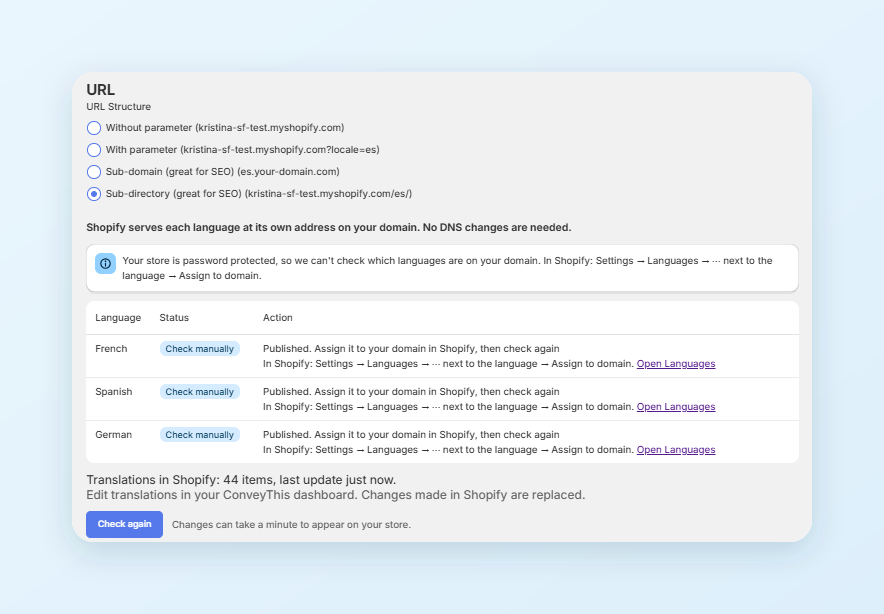
The copy runs in the background about every 15 minutes, and right after you save your settings. Text that has no ConveyThis translation yet, such as a brand new product, is translated on the page by the widget first and reaches Shopify on a later run. The app shows the result under the language table: “Translations in Shopify: N items, last update …”.
What this gives you
- Language URLs on your own domain. Each language gets its own folder with the hreflang tags Shopify generates, so search engines can discover each version.
- Translated text in the HTML. Product, collection, page and blog text that Shopify holds a translation for is served in that language without JavaScript. Google can render JavaScript, but not every crawler does, so text that is already in the HTML is the safer place for it. It also arrives translated on first paint, while menus or app blocks that the widget translates can appear a moment later.
- Cart, checkout and account pages in the visitor’s language, handled by Shopify’s language settings, as before.
- Pages straight from Shopify. Nothing sits between your visitors and Shopify, so pages are delivered the way they are today.
- One place to edit. Change a translation in the ConveyThis dashboard or the visual editor, or add a glossary rule for a brand name, and the change reaches Shopify on the next copy run.
Working alongside Translate & Adapt
You don’t need to uninstall anything or migrate. The languages you published stay published, and translations you made by hand in Translate & Adapt keep showing on /es/. Shopify’s own help page says the app “is compatible with other third-party translation apps that use the Translations API”, and that content created with those apps “is available in both the Translate & Adapt app and the third-party translation app”.
ConveyThis fills in what’s missing and manages what it wrote. If you edit a ConveyThis-managed value directly in Shopify, the next run replaces it, so make those edits in ConveyThis. A field that only has a Translate & Adapt translation stays as it is. If ConveyThis also has a translation for that field, for example one you edited in the ConveyThis dashboard, the ConveyThis version is the one Shopify serves.
The copy also follows your ConveyThis settings:
- Only the languages you selected in ConveyThis are copied.
- Removing a language in ConveyThis removes its copied translations from Shopify.
- Switching away from Sub-directory removes everything ConveyThis put into Shopify.
The URLs, hreflang tags and checkout languages Shopify gives you stay exactly as they are.
How to turn on Shopify language subfolders
- Open ConveyThis in your Shopify admin and go to Settings. Under URL Structure choose Sub-directory. The Current Language in ConveyThis must be your store’s default language in Shopify.
- The app lists each of your languages with its status and the action it needs.
- For a language that’s not enabled in Shopify or not published, click Enable. The app enables it in Shopify and publishes it.
- For a language that’s not assigned to your domain, go to Shopify’s Settings → Languages, open the ⋯ menu next to the language and choose Assign to domain. Back in the app, click Check again.
- Save. Open
yourstore.com/es/and the page is in Spanish.
Two things that help:
- Password-protected store. While the storefront is behind a password, the app can’t see which languages are assigned to your domain and shows Check manually. Follow step 4 and check the storefront yourself.
- Your theme’s own language selector. Many Shopify themes show a language picker in the header or footer. You can keep it, or turn it off in the theme editor so visitors see one switcher.
The Shopify integration guide covers installing the app and choosing languages, and its section on translated URLs with Sub-directory walks through this setup.
Already have translations?
Keep them. Translations in Translate & Adapt stay in Shopify, and ConveyThis won’t translate that text again. If you have translations from another tool as a CSV or TMX file, import them in the ConveyThis dashboard under Translation Management → CSV/TMX, one file per language. A CSV has the source text in the first column and the translation in the second; a TMX file is imported as it is. The import and export guide has the details.
What to know before you switch
- Shopify allows up to 20 languages. The app tells you when you reach the limit.
- Not every ConveyThis language is a Shopify language. Shopify doesn’t offer every language for storefront subfolders. Latin, Haitian Creole, Cantonese and Hawaiian are examples of ConveyThis languages it doesn’t offer, and the app greys them out in Sub-directory mode. A store that needs one of them stays on the same-URL or subdomain structure.
- Regional variants are markets, not languages. In Shopify, Mexican Spanish or Canadian French is a market with its own folder, such as
/es-mx/or/fr-ca/, and its own country, currency and prices. This release doesn’t map ConveyThis regional variants to markets. On a market folder the page uses the base language translation, so/fr-ca/shows the French translation. - Portuguese and Tagalog. Portuguese defaults to Brazilian Portuguese, and you can choose European Portuguese in the app. Tagalog is shown as Filipino, which is how Shopify names it.
- Some content stays with the widget. Menus, theme and app text, reviews, metafields and URL handles are translated on the page, not in the HTML, and brand new text reaches Shopify one copy run later.
Frequently asked questions
Do I need to change my DNS records?
No. Shopify serves the language folders on your existing domain, so there’s no A record, CNAME or proxy to set up. If you used the subdomain structure before, you can keep it or switch to subfolders in the app.
Which plan do I need?
Sub-directory is available on the Business plan or higher. See the pricing page for the plans.
Will ConveyThis overwrite my Translate & Adapt translations?
Not the ones ConveyThis has no translation for. On /es/ the ConveyThis widget skips text that Shopify already shows translated, so a product title you wrote in Translate & Adapt usually stays as it is. If ConveyThis does hold its own translation for the same field, for example one you edited in the ConveyThis dashboard, ConveyThis writes its version and replaces the Translate & Adapt one. Keep each field in one place to avoid surprises.
Can I use market folders like /es-mx/?
Not in this release. The app offers the languages Shopify supports as storefront languages. On a market folder the page uses the base language translation, for example French on /fr-ca/.
Is the checkout translated?
Yes, by Shopify. When a language is published, Shopify shows the checkout, the cart and the account pages in that language. Our checkout guide explains the settings. Notification emails need their templates translated in Shopify; see the email guide.
What happens to stores using the same URL or a subdomain?
Nothing. Those structures work as before. The change applies only when you choose Sub-directory in the app.
Sources
- Shopify Help Center, Translate & Adapt app requirements, retrieved 2026-10-20, https://help.shopify.com/en/manual/international/languages/translate-adapt-app/requirements
- Shopify.dev, Manage translated content, retrieved 2026-10-20, https://shopify.dev/docs/apps/build/markets/manage-translated-content
- Shopify Help Center, Languages, retrieved 2026-10-20, https://help.shopify.com/en/manual/markets/languages
- Google Search Central, JavaScript SEO basics, retrieved 2026-10-20, https://developers.google.com/search/docs/crawling-indexing/javascript/javascript-seo-basics
- ConveyThis Help Center, How do I add ConveyThis to Shopify?, https://www.conveythis.com/help/shopify-integration
- ConveyThis Help Center, Importing/Exporting Translations and Glossary, https://www.conveythis.com/help/import-export-translations
Next steps
Already using ConveyThis on Shopify? Open the ConveyThis app in your Shopify admin, go to Settings, and under URL Structure choose Sub-directory. The app shows what each language still needs.
New to ConveyThis? Install the ConveyThis app from the Shopify App Store and start on the Free plan. Sub-directory itself needs the Business plan or higher.












;fill-opacity:1;'%20d='M%2019.511719%2039.964844%20C%208.304688%2039.964844%200%2031.289062%200%2020.324219%20L%200%2020.230469%20C%200%209.363281%208.160156%200.46875%2019.847656%200.46875%20C%2027.023438%200.46875%2031.320312%202.878906%2034.847656%206.375%20L%2029.519531%2012.492188%20C%2026.59375%209.820312%2023.59375%208.179688%2019.800781%208.179688%20C%2013.390625%208.179688%208.761719%2013.53125%208.761719%2020.085938%20L%208.761719%2020.203125%20C%208.761719%2026.757812%2013.273438%2032.203125%2019.800781%2032.203125%20C%2024.144531%2032.203125%2026.808594%2030.46875%2029.808594%2027.722656%20L%2035.136719%2033.121094%20C%2031.199219%2037.335938%2026.855469%2039.964844%2019.511719%2039.964844%20'/%3e%3cpath%20style='%20stroke:none;fill-rule:nonzero;fill:rgb(26.274511%25,42.352942%25,94.901961%25);fill-opacity:1;'%20d='M%2035.878906%200.0351562%20L%2044.136719%200.0351562%20L%2044.136719%2039.867188%20L%2035.878906%2039.867188%20Z%20M%2035.878906%200.0351562%20'/%3e%3cpath%20style='%20stroke:none;fill-rule:nonzero;fill:rgb(26.274511%25,42.352942%25,94.901961%25);fill-opacity:1;'%20d='M%2059.472656%2016.15625%20C%2056.039062%2016.15625%2053.808594%2018.613281%2053.160156%2022.375%20L%2065.617188%2022.375%20C%2065.113281%2018.664062%2062.953125%2016.15625%2059.472656%2016.15625%20M%2073.535156%2027.578125%20L%2053.28125%2027.578125%20C%2054.097656%2031.335938%2056.710938%2033.3125%2060.40625%2033.3125%20C%2063.191406%2033.3125%2065.183594%2032.445312%2067.464844%2030.300781%20L%2072.191406%2034.492188%20C%2069.480469%2037.867188%2065.566406%2039.941406%2060.289062%2039.941406%20C%2051.527344%2039.941406%2045.070312%2033.769531%2045.070312%2024.832031%20L%2045.070312%2024.710938%20C%2045.070312%2016.347656%2051%209.480469%2059.472656%209.480469%20C%2069.191406%209.480469%2073.65625%2017.074219%2073.65625%2025.363281%20L%2073.65625%2025.457031%20C%2073.65625%2026.300781%2073.609375%2026.808594%2073.535156%2027.578125%20'/%3e%3cpath%20style='%20stroke:none;fill-rule:nonzero;fill:rgb(26.274511%25,42.352942%25,94.901961%25);fill-opacity:1;'%20d='M%2089.375%2039.796875%20L%2081.863281%2039.796875%20L%2070.390625%2010.324219%20L%2079.152344%2010.324219%20L%2085.679688%2029.914062%20L%2092.257812%2010.324219%20L%20100.847656%2010.324219%20Z%20M%2089.375%2039.796875%20'/%3e%3cpath%20style='%20stroke:none;fill-rule:nonzero;fill:rgb(26.274511%25,42.352942%25,94.901961%25);fill-opacity:1;'%20d='M%20111.550781%2016.15625%20C%20108.121094%2016.15625%20105.886719%2018.613281%20105.238281%2022.375%20L%20117.695312%2022.375%20C%20117.191406%2018.664062%20115.03125%2016.15625%20111.550781%2016.15625%20M%20125.617188%2027.578125%20L%20105.359375%2027.578125%20C%20106.175781%2031.335938%20108.792969%2033.3125%20112.488281%2033.3125%20C%20115.246094%2033.3125%20117.265625%2032.445312%20119.542969%2030.300781%20L%20124.273438%2034.492188%20C%20121.558594%2037.867188%20117.648438%2039.941406%20112.367188%2039.941406%20C%20103.609375%2039.941406%2097.152344%2033.769531%2097.152344%2024.832031%20L%2097.152344%2024.710938%20C%2097.152344%2016.347656%20103.078125%209.480469%20111.550781%209.480469%20C%20121.273438%209.480469%20125.734375%2017.074219%20125.734375%2025.363281%20L%20125.734375%2025.457031%20C%20125.734375%2026.300781%20125.6875%2026.808594%20125.617188%2027.578125%20'/%3e%3cpath%20style='%20stroke:none;fill-rule:nonzero;fill:rgb(26.274511%25,42.352942%25,94.901961%25);fill-opacity:1;'%20d='M%20143.566406%2018.757812%20C%20138.070312%2018.757812%20134.710938%2022.085938%20134.710938%2029.074219%20L%20134.710938%2039.867188%20L%20126.457031%2039.867188%20L%20126.457031%2010.613281%20L%20134.710938%2010.613281%20L%20134.710938%2016.519531%20C%20136.390625%2012.46875%20139.128906%209.867188%20144%2010.085938%20L%20144%2018.757812%20Z%20M%20143.566406%2018.757812%20'/%3e%3c/g%3e%3c/svg%3e)




;fill-opacity:1;'%20d='M%20144.558594%2039.894531%20L%20155.4375%209.839844%20C%20155.4375%209.839844%20147.28125%209.839844%20139.121094%2011.515625%20L%20128.867188%2039.894531%20Z%20M%20142.675781%201.78125%20L%20140.585938%207.539062%20C%20148.738281%205.863281%20156.902344%205.863281%20156.902344%205.863281%20L%20158.992188%200.105469%20C%20158.992188%200.105469%20150.832031%200.105469%20142.675781%201.78125%20M%2085.980469%2032.773438%20C%2090.898438%2033.71875%2095.914062%2034.136719%20101.039062%2034.136719%20C%20106.375%2034.136719%20110.140625%2032.984375%20110.554688%2029.320312%20C%20110.765625%2027.640625%20109.089844%2026.382812%20106.167969%2024.707031%20C%20102.816406%2022.824219%2099.894531%2021.878906%2096.960938%2019.886719%20C%2094.03125%2017.898438%2092.78125%2014.859375%2093.71875%2011.507812%20C%2094.871094%207.636719%2097.585938%205.4375%20101.664062%203.34375%20C%20106.480469%200.9375%20110.242188%20-0.0078125%20119.550781%20-0.0078125%20C%20125.40625%20-0.0078125%20131.054688%200.515625%20136.597656%201.667969%20L%20134.609375%207.113281%20C%20129.691406%206.167969%20124.675781%205.75%20119.550781%205.75%20C%20114.214844%205.75%20110.453125%206.90625%20110.035156%2010.570312%20C%20109.828125%2012.246094%20111.5%2013.503906%20114.425781%2015.179688%20C%20117.773438%2017.066406%20120.695312%2018.011719%20123.628906%2020%20C%20126.558594%2021.988281%20127.808594%2025.027344%20126.871094%2028.378906%20C%20125.71875%2032.253906%20123.003906%2034.449219%20118.925781%2036.542969%20C%20114.113281%2038.949219%20110.347656%2039.894531%20101.039062%2039.894531%20C%2095.183594%2039.894531%2089.535156%2039.375%2083.992188%2038.21875%20Z%20M%2062.34375%2039.894531%20L%2071.441406%2014.867188%20C%2074.476562%206.488281%2063.390625%209.527344%2060.875%2011.515625%20C%2058.890625%2012.984375%2055.332031%2016.441406%2054.078125%2020.105469%20L%2046.859375%2040%20L%2031.175781%2040%20L%2040.273438%2014.867188%20C%2043.308594%206.488281%2032.222656%209.527344%2029.710938%2011.515625%20C%2027.722656%2012.984375%2024.167969%2016.441406%2022.910156%2020.105469%20L%2015.691406%2040%20L%200.0078125%2040%20L%2014.441406%200.105469%20C%2019.464844%200.105469%2022.179688%201.257812%2024.375%203.457031%20C%2025.207031%204.289062%2025.734375%205.339844%2026.046875%206.496094%20C%2028.980469%204.714844%2031.589844%203.351562%2033.371094%202.726562%20C%2036.613281%201.46875%2040.691406%200.105469%2045.714844%200.105469%20C%2050.734375%200.105469%2053.453125%201.257812%2055.644531%203.457031%20C%2056.480469%204.289062%2057.007812%205.339844%2057.320312%206.496094%20C%2060.25%204.714844%2062.863281%203.351562%2064.640625%202.726562%20C%2067.886719%201.46875%2071.964844%200.113281%2076.984375%200.113281%20C%2082.007812%200.113281%2084.722656%201.265625%2086.917969%203.464844%20C%2089.21875%205.660156%2089.113281%209.742188%2088.28125%2012.050781%20L%2078.027344%2039.902344%20L%2062.34375%2039.902344%20Z%20M%2062.34375%2039.894531%20'/%3e%3c/g%3e%3c/svg%3e)

;fill-opacity:1;'%20d='M%202.453125%209.882812%20L%202.453125%2012.851562%20L%207.304688%2012.851562%20L%2016.800781%2030.734375%20L%2028.488281%2030.734375%20L%2037.980469%2012.824219%20L%2042.832031%2012.792969%20L%2042.84375%209.882812%20L%2028.328125%209.882812%20L%2028.328125%2012.804688%20L%2032.195312%2012.804688%20L%2025.488281%2025.515625%20L%2018.234375%2012.847656%20L%2023.527344%2012.824219%20L%2023.515625%209.882812%20Z%20M%2096.097656%209.882812%20L%2096.097656%2012.851562%20L%20100.949219%2012.851562%20L%20110.445312%2030.734375%20L%20122.128906%2030.734375%20L%20131.625%2012.824219%20L%20136.476562%2012.792969%20L%20136.484375%209.882812%20L%20121.972656%209.882812%20L%20121.972656%2012.804688%20L%20125.835938%2012.804688%20L%20119.132812%2025.515625%20L%20111.878906%2012.847656%20L%20117.167969%2012.824219%20L%20117.160156%209.882812%20Z%20M%2072.222656%209.882812%20L%2072.222656%2012.851562%20L%2077.078125%2012.851562%20L%2077.082031%2027.453125%20L%2071.96875%2027.453125%20L%2071.96875%2030.707031%20L%2077.085938%2030.734375%20L%20101.3125%2030.734375%20L%20101.3125%2021.027344%20L%2098.15625%2021.027344%20C%2097.984375%2026.167969%2093.542969%2027.457031%2091.675781%2027.457031%20C%2089.960938%2027.457031%2086.640625%2027.453125%2086.640625%2027.453125%20L%2086.640625%2012.847656%20L%2091.417969%2012.824219%20L%2091.410156%209.882812%20Z%20M%2055.890625%209.285156%20C%2047.644531%209.285156%2040.960938%2014.214844%2040.960938%2020.292969%20C%2040.960938%2026.375%2047.644531%2031.304688%2055.890625%2031.304688%20C%2064.136719%2031.304688%2070.824219%2026.375%2070.824219%2020.292969%20C%2070.824219%2014.214844%2064.136719%209.285156%2055.890625%209.285156%20Z%20M%2055.675781%2028.0625%20C%2052.769531%2028.0625%2050.414062%2024.566406%2050.414062%2020.25%20C%2050.414062%2015.933594%2052.769531%2012.4375%2055.675781%2012.4375%20C%2058.582031%2012.4375%2060.941406%2015.933594%2060.941406%2020.25%20C%2060.941406%2024.566406%2058.582031%2028.0625%2055.675781%2028.0625%20Z%20M%20149.539062%208.921875%20C%20141.289062%208.921875%20134.605469%2013.933594%20134.605469%2020.113281%20C%20134.605469%2026.292969%20141.289062%2031.300781%20149.539062%2031.300781%20C%20157.78125%2031.300781%20164.46875%2026.292969%20164.46875%2020.113281%20C%20164.46875%2013.933594%20157.78125%208.921875%20149.539062%208.921875%20Z%20M%20149.324219%2028.007812%20C%20146.417969%2028.007812%20144.0625%2024.453125%20144.0625%2020.066406%20C%20144.0625%2015.679688%20146.417969%2012.125%20149.324219%2012.125%20C%20152.230469%2012.125%20154.585938%2015.679688%20154.585938%2020.066406%20C%20154.585938%2024.453125%20152.230469%2028.007812%20149.324219%2028.007812%20Z%20M%20149.324219%2028.007812%20'/%3e%3c/g%3e%3c/svg%3e)





