



Joomla still powers about 1.1% of all websites, and 1.6% of the sites whose CMS can be identified (W3Techs, November 2026). Many of those sites serve more than one country, and their owners run into the same wall: Joomla manages languages, but it doesn’t translate anything.
So the real question is who writes and maintains every translated page: you, or software. This guide compares Joomla’s built-in setup with the ConveyThis extension on Joomla 4, 5 and 6, walks through the setup step by step, and covers the one server setting that quietly breaks translated URLs on a fresh install.
Key takeaways
- Joomla’s built-in setup (Language Filter plus Multilingual Associations) needs a separate article, menu and module for every language, written by hand.
- A translation extension translates the pages Joomla already renders and serves them at URLs like
/es/about, with hreflang.- The two approaches compete for the same
/es/addresses, so pick one.- On Apache, translated URLs return 404 until
htaccess.txtis renamed to.htaccess.- ConveyThis for Joomla is free to install, and the free plan covers 10,000 words and 2,500 translated pageviews a month.
What are the two ways to make Joomla multilingual?
There are two routes, and they work at different levels. The built-in route translates content items: you keep a copy of each article in each language and tell Joomla which copies belong together. An extension translates pages: it takes the finished HTML Joomla produces and translates that, so articles, modules, menus and most third-party output are covered in one pass.
| Built-in multilingual | Translation extension (ConveyThis) | |
|---|---|---|
| Setup time | Language packs, content languages, plugin, then menus and modules per language | About ten minutes |
| Who translates | You or a translator, item by item | Machine translation first, then you edit what matters |
| Content per language | Separate articles, categories, menus and modules | One set of content; translations stored by the service |
| New article published | Write and associate a copy in each language | Picked up and translated automatically |
| Language URLs | Yes, /es/-style prefixes | Yes, /es/about or es.example.com |
| hreflang | Through associations | Added automatically |
| Translated sitemaps, metadata, JSON-LD | Partly, depending on extensions | Included |
| Cost | Free software, paid translator time | Free plan up to 10,000 words; paid plans by words and languages |
The built-in setup is workable for a handful of stable pages in two languages, with a fluent editor on the team. Past that point the manual copies become the bottleneck. That’s the gap ConveyThis closes: one set of content, translated pages at their own URLs, and nothing to copy when you publish.
How does Joomla’s built-in multilingual setup work?
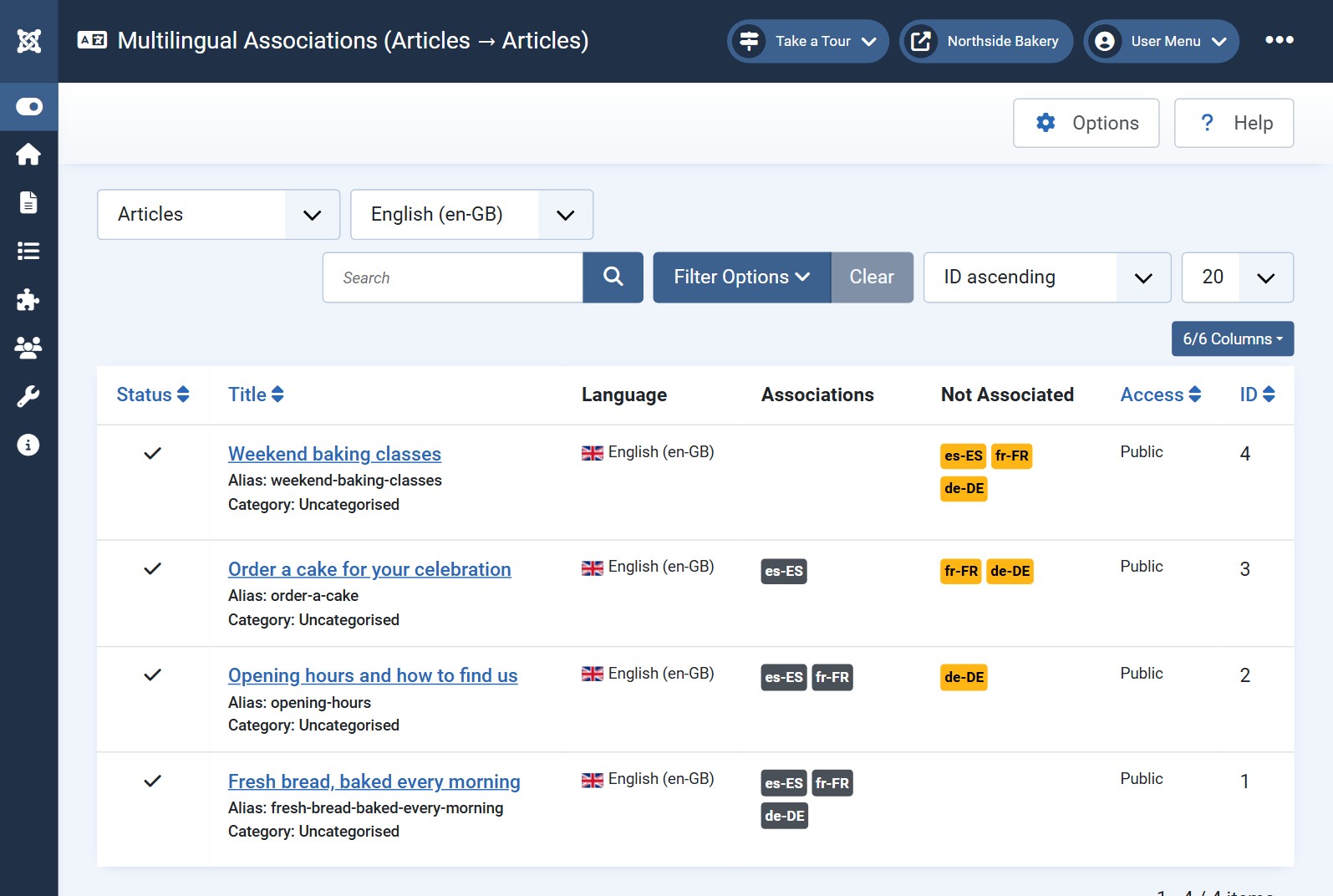
Joomla’s own approach has five parts. You install a language pack for each language, create a content language for it, and enable the System - Language Filter plugin, setting Item Associations to Yes (Joomla manual). Then you build the language-specific structure: a home page menu item per language and a Language Switcher module.
After that comes the real work. Every article gets a translated twin, created from its Associations tab and managed side by side in Components → Multilingual Associations (Joomla help). The same goes for categories, menu items, contacts and modules that hold text.
Two things tend to surprise people:
- Nothing is translated for you. The Create button makes an empty copy in the target language. The words are your job.
- Content set to “All” languages is invisible to associations. If your existing articles use the default “All”, the associations list stays empty until you assign each item a specific language. On an older site, that’s a cleanup project before translation even starts.
For a five-page brochure site in two languages, that’s a weekend. For a site with 300 articles and four languages, it’s 900 extra items to create, and to update every time the original changes.
When is an extension the better choice?
An extension makes sense when the content changes faster than you can translate it by hand. Because it works on the rendered page, it doesn’t care whether text comes from an article, a module, a template override or a component like HikaShop. Joomla stays single-language in the back end, which keeps the editorial workflow simple.
It’s usually the better fit if:
- you publish or update content every week;
- you want three or more languages;
- you rely on third-party components whose output the built-in associations don’t reach;
- nobody on the team writes the target languages fluently, and you’d rather edit a machine draft than start from a blank page.
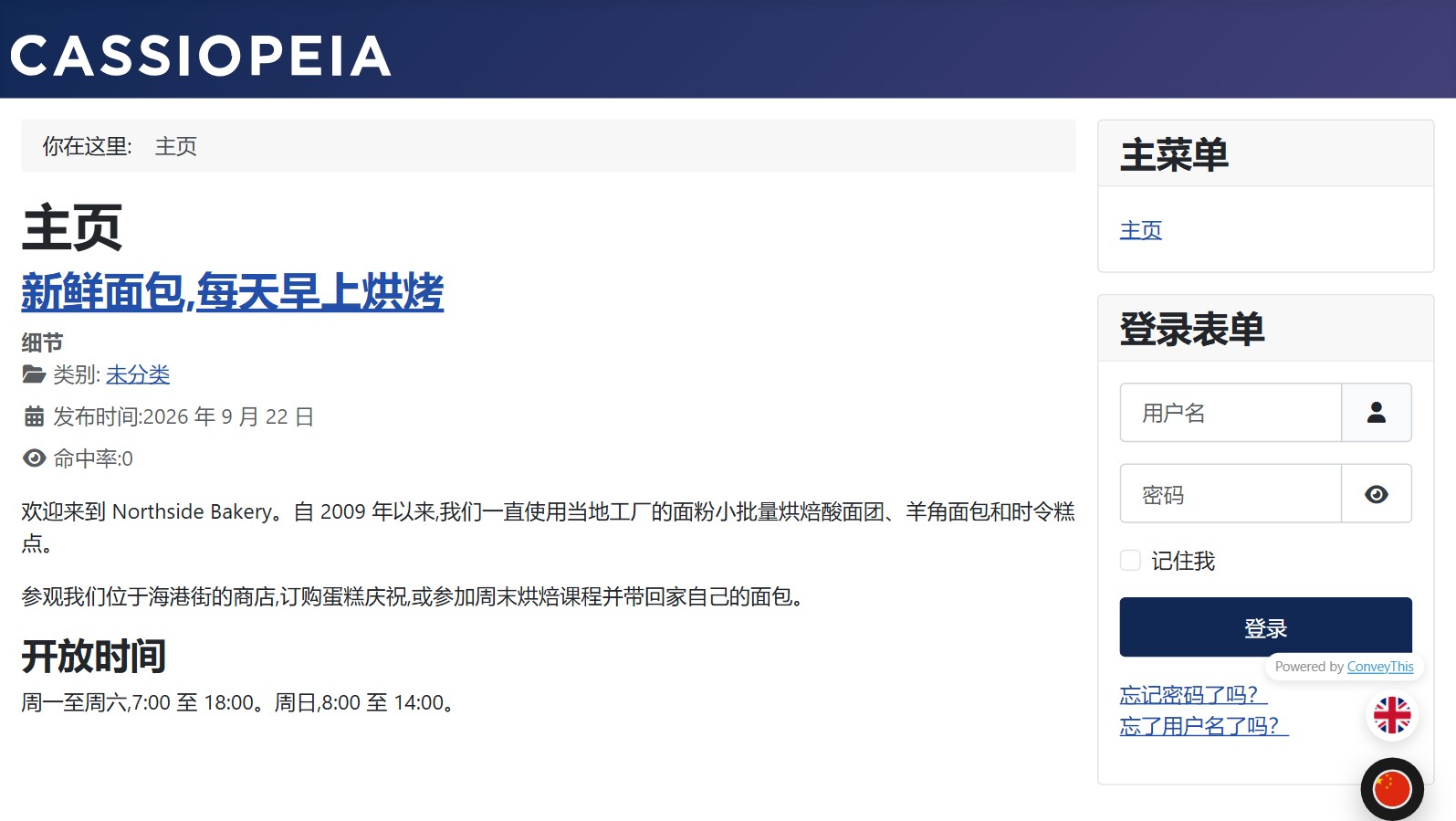
With ConveyThis, each language gets its own indexable URL with hreflang tags, a translated sitemap, and translated titles, meta descriptions and structured data. You keep control of the wording: edit any translation in the visual editor, and lock brand and product names with the glossary.
The one case where the built-in setup is the right tool is when every language needs genuinely different content (different products, different articles per market). That’s not translation, that’s separate sites under one roof.
Translating a Joomla site for your business? ConveyThis for Joomla is a free extension for Joomla 4, 5 and 6. The free plan includes 10,000 words and 2,500 translated pageviews a month, with no credit card. Start free or see how the Joomla extension works.
How do I set up ConveyThis on Joomla?
The setup takes about ten minutes, most of it waiting for the first pages to translate. The Joomla setup guide has screenshots for each step.
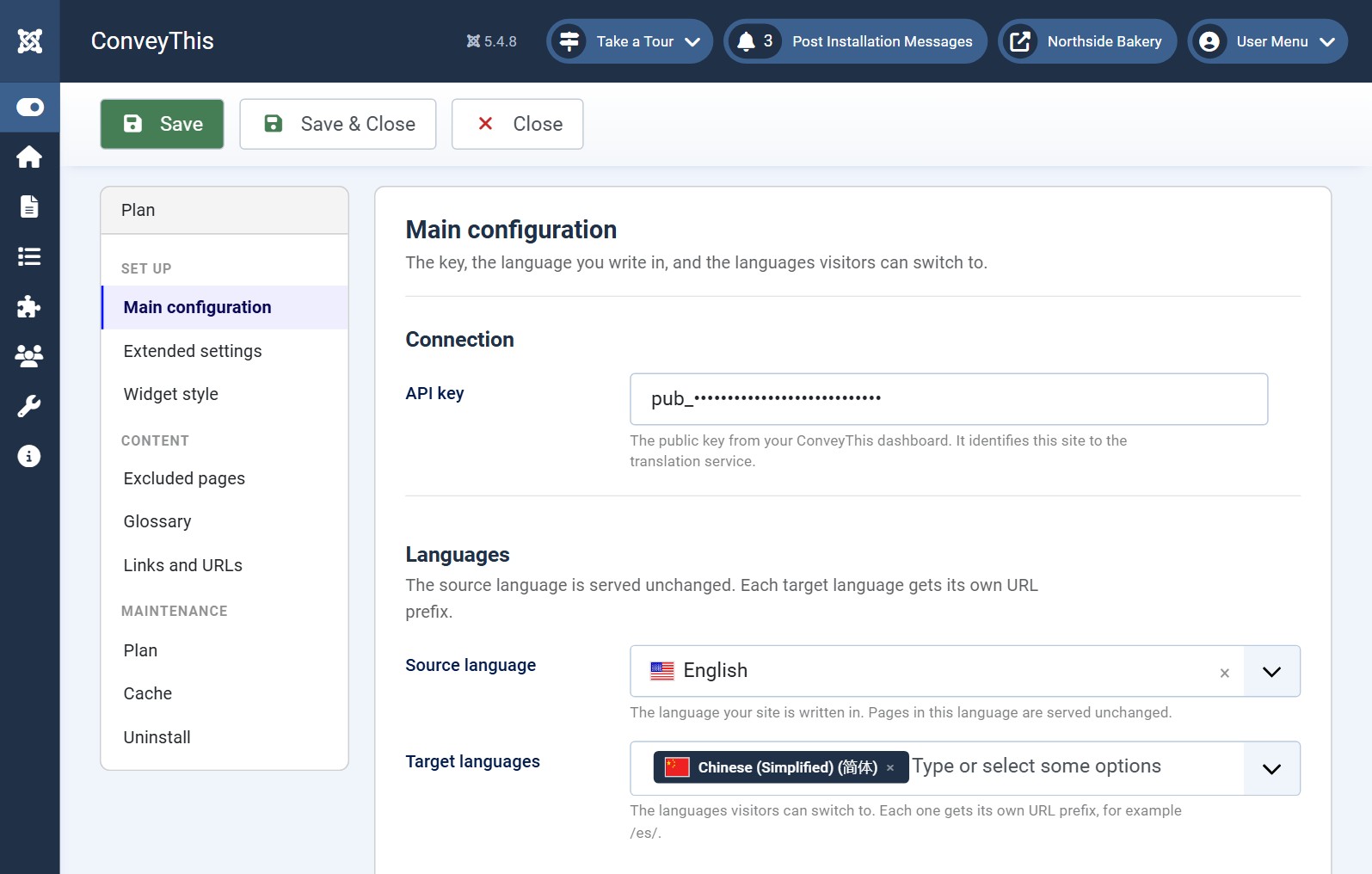
- Install the extension. In the administrator, go to System → Install → Extensions, open Install from Web and search for ConveyThis. It’s listed in the Joomla Extensions Directory for J4, J5 and J6. If Install from Web isn’t available, download the package and use Upload Package File.
- Create a free account and copy your API key (it starts with
pub_). - Open Components → ConveyThis, paste the key and check it.
- Choose your languages. If you already picked them in your ConveyThis dashboard, the setup screen shows them and you just confirm.
- Turn off the Language Filter plugin. ConveyThis detects it and offers to do this for you.
- Turn on URL rewriting and check the server file (next section).
- Reload the site. The language switcher appears; you can restyle it or place it in any template position with the included module.
From there, open a few translated pages, fix the wording that matters in the visual editor, and add brand and product names to the glossary so they’re never translated.
Why do translated Joomla pages return 404?
This is the most common reason a multilingual Joomla site “doesn’t work”, and it has nothing to do with translation. A translated page lives at an address like /es/about. That path doesn’t exist on disk, so the web server has to hand it to Joomla’s index.php. On Apache, the rules that do this ship as htaccess.txt, and Joomla leaves the renaming to you.
We tested this on a clean Joomla 5.4 install, changing one thing at a time:
.htaccess present | Use URL Rewriting | /es/about |
|---|---|---|
| Yes | On | 200, page loads |
| Yes | Off | 200, page loads |
| No (Joomla’s default after install) | Off | 404 |
The file decides it, not the Joomla setting. The confusing part is that the links on the page still look correct, so nothing tells the site owner what’s wrong.
The fix depends on the server:
- Apache or LiteSpeed: rename
htaccess.txtto.htaccessin the Joomla root. - IIS: rename
web.config.txttoweb.config. - NGINX: the server block needs a
try_filesrule that sends unknown paths toindex.php. Your host can add it.
Then set Use URL Rewriting to Yes under System → Global Configuration → SEO. The ConveyThis panel now checks this for you: it requests a translated address on your own site and warns you if it returns 404, naming the fix for Apache and NGINX.
How do I check that the translated site works?
Four quick checks after setup catch most problems before visitors or Google find them:
- Language URLs load. Open
/es/and one inner page such as/es/about. Both should return the translated page, not a 404 or the original language. - hreflang is in the source. View the page source and look for
<link rel="alternate" hreflang="...">lines, one per language plus the original. - The switcher keeps the page. Switching language on an inner page should land on the same page in the new language, not on the home page.
- The old method is off. Only one tool should own the
/es/addresses, so the Language Filter plugin and any old translate module should be disabled.
What about Google Translate modules for Joomla?
Plenty of Joomla sites added a “Translate this page” dropdown years ago, often a module that loaded Google’s Website Translator widget. Google ended support for that widget on October 1, 2026 (the full story), so those modules are now running unsupported code.
Even when they worked, they didn’t help with search. The dropdown translates in the visitor’s browser and never creates a separate address for each language. Google recommends a distinct URL per language version, linked with hreflang (Google Search Central). Without that, there’s no Spanish or German page for Google to index, however good the translation looks on screen.
If your site still has one of these modules, check whether it still loads anything. Then replace it with either the built-in setup or an extension that creates real language URLs.
Which Joomla versions are covered?
Joomla 6.0 was released on 14 October 2025, alongside 5.4, and moving from 5.4 to 6 is an upgrade rather than a migration (Joomla). The built-in multilingual features work the same way across 4, 5 and 6.
ConveyThis supports Joomla 4, 5 and 6 on PHP 8.1 or newer. It has been tested end to end on Joomla 4.4, 5.4 and 6.1. Joomla 3 isn’t supported, so a Joomla 3 site needs upgrading first. For an old site, that upgrade is worth doing anyway: Joomla 3 stopped receiving security fixes in 2023.
FAQ
Does Joomla support multiple languages out of the box?
Yes. Joomla’s core includes language packs, content languages, the System - Language Filter plugin and the Multilingual Associations component. It manages the languages, but it doesn’t translate anything: you write and link a separate version of each article, menu and module yourself.
Can I use Joomla’s Language Filter together with a translation extension?
Usually not. The Language Filter and extensions such as ConveyThis both put the language code at the start of the URL, for example /es/, so they compete for the same addresses. Choose one approach. ConveyThis detects the filter and offers to turn it off.
Why do my translated Joomla pages return 404?
On Apache, Joomla ships its rewrite rules as htaccess.txt and doesn’t rename the file for you. Until it’s renamed to .htaccess, the server never passes /es/about to Joomla, so every translated page returns 404. Turn on Use URL Rewriting in Global Configuration as well.
Is a Google Translate module enough for a multilingual Joomla site?
Not for search. A dropdown that translates in the browser doesn’t create separate language URLs, so there’s nothing for Google to index in other languages, and Google’s own Website Translator widget lost support on October 1, 2026.
Which Joomla versions does ConveyThis support?
Joomla 4, 5 and 6 on PHP 8.1 or newer. Joomla 3 isn’t supported, so a Joomla 3 site needs to be upgraded first.
The short version
Joomla’s built-in multilingual setup only manages languages. Every translated page is still yours to write and keep in sync, which is realistic for a few stable pages in two languages. For anything bigger, ConveyThis translates the pages Joomla already renders, gives each language its own URL with hreflang, and keeps up when you publish. Either way, check that /es/ actually loads before you tell anyone the site is multilingual.
Making your Joomla site multilingual?
Install the free ConveyThis extension, keep your template, and get language URLs and hreflang without copying a single article.
Start translating your website


