
Can visitors see my website in their browser language automatically?
Yes. When you turn on automatic redirect, visitors whose browser is set to one of your languages see your translated pages straight away. For example, a visitor with a German browser lands on your German pages.
How do I turn it on?
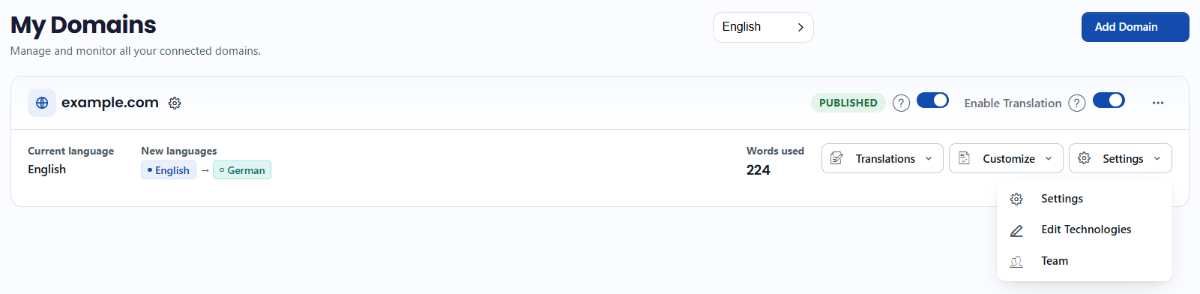
- Go to Domains in your ConveyThis dashboard, open the Settings menu on your website and choose Settings.
- Expand Advanced.
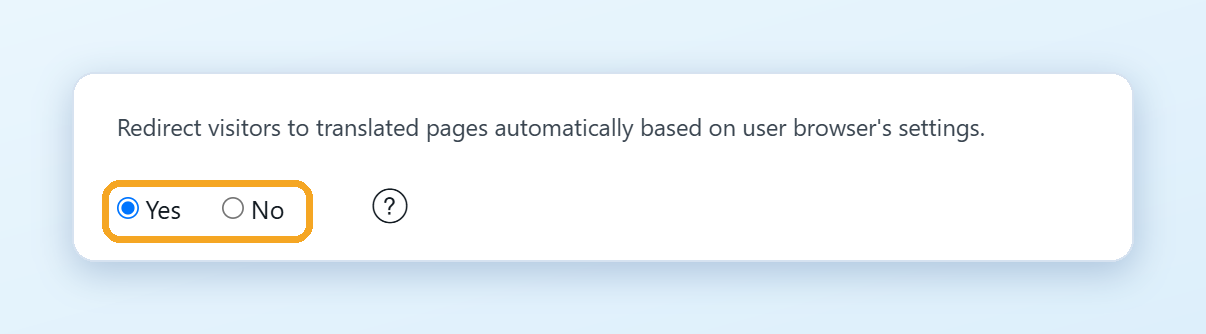
- Set Redirect visitors to translated pages automatically based on user browser’s settings to Yes. Your changes are saved automatically.
On WordPress, you find the same option in the plugin under ConveyThis > Extended settings. Click Save settings after you change it. In the plugin, the option is available from the Business plan.
This feature isn’t available on the Free plan.
What visitors see
- On their first visit, visitors go to the translated page in their browser language.
- If they switch to another language, they stay on it. They aren’t redirected again.
- Visitors whose browser language isn’t one of your languages see your original pages.
To test it, open your website in a private (incognito) window.
See How can I automatically redirect my visitors to their own language? for all the details.