


hreflang implementations tend to fail in a small number of repeatable ways: invalid codes, missing return links, redirected targets, canonical conflicts, and incomplete language clusters. This guide explains how to avoid those failures and validate the result.
If Google is showing the wrong language URL in search results, or your translated pages are difficult to discover, this guide is for you. Google documents the supported approaches in its localized versions guide.
hreflang is one of those technical SEO topics that gets explained over and over but never quite clicks, because most explanations skip the parts that actually break in production. The four-line example works fine until you have 23 languages, regional variants, alternate page formats, and a checkout flow that lives on a subdomain. Then small inconsistencies can leave parts of the language cluster unrecognized.
This guide covers the implementation that works in the real world. Not the textbook version. The version where Cloudflare caches your headers, Next.js generates pages on demand, and your CMS adds trailing slashes that don’t exist in your sitemap.
What hreflang actually does (and doesn’t do)
hreflang tells search engines which version of a page to show users in different languages or regions. It’s a relationship signal, not a ranking signal.
This distinction matters. Adding hreflang doesn’t make your French page rank higher in France. It tells Google: “this English page and this French page are equivalent translations of the same content. When someone searches in French from France, show them the French one.” Without it, Google might still rank your French page, but it might also serve your English page to French searchers — or worse, treat both as duplicate content and pick one to demote.
Three things hreflang does:
- Routes the right language version to the right user.
- Helps Google understand that similar translated pages are intended for different audiences.
- Connects equivalent language or regional variants as a cluster.
Three things hreflang does not do:
- Translate your content (obvious, but worth stating).
- Improve rankings within a single market.
- Fix poor translation quality or thin content.
The basic syntax (and why most examples are incomplete)
Here’s the version most guides show you. It’s correct, and it’s also missing the most important line:
<link rel="alternate" hreflang="en" href="https://example.com/" />
<link rel="alternate" hreflang="fr" href="https://example.com/fr/" />
<link rel="alternate" hreflang="de" href="https://example.com/de/" />
This snippet declares three language versions. It will partially work. The issue: every page that uses these tags must reference itself in the list. Otherwise Google treats the references as one-directional and may discard them.
The complete version on the English page looks like this:
<link rel="alternate" hreflang="en" href="https://example.com/" />
<link rel="alternate" hreflang="fr" href="https://example.com/fr/" />
<link rel="alternate" hreflang="de" href="https://example.com/de/" />
<link rel="alternate" hreflang="x-default" href="https://example.com/" />
Two things changed:
- Self-referencing hreflang. The English page now declares itself as the English version. Without it, the set is incomplete and may not be interpreted as intended.
- x-default. This declares the fallback page for users whose language doesn’t match any specified version. If a Korean user lands on your site and you don’t have Korean, x-default tells Google which page to serve.
Now here’s the part that’s almost never explained correctly: the same logic applies to the French page and the German page. Each page must list every language version, including itself, and x-default. Not just the English source.
On the French page:
<link rel="alternate" hreflang="en" href="https://example.com/" />
<link rel="alternate" hreflang="fr" href="https://example.com/fr/" />
<link rel="alternate" hreflang="de" href="https://example.com/de/" />
<link rel="alternate" hreflang="x-default" href="https://example.com/" />
Identical to the English page. That’s the point. hreflang declarations must be reciprocal — every language version must reference every other language version. If page A points to page B, page B must point back to page A. Google calls these “return tags,” and they’re the single most-failed validation rule in international SEO.
Language codes: the cheat sheet
hreflang codes follow the format language or language-REGION. Languages use ISO 639-1 (two-letter, lowercase). Regions use ISO 3166-1 Alpha 2 (two-letter, uppercase). The most common confusions:
| Code | What it actually means | Common mistake |
|---|---|---|
en | English (any region) | Using “en” when you mean en-US specifically |
en-US | English for United States users | Writing en-us (lowercase region) — invalid |
en-GB | English for United Kingdom | Writing en-UK — UK is not a valid country code |
zh-Hans | Simplified Chinese (script-based) | Using zh-CN when you mean script, not region |
zh-Hant | Traditional Chinese | Using zh-TW for all Traditional Chinese users |
pt-BR / pt-PT | Brazilian / European Portuguese | Using just “pt” — Brazil and Portugal differ significantly |
es-419 | Latin American Spanish (UN region code) | Using es-MX as a stand-in for all of LATAM |
x-default | Fallback for unmatched languages | Omitting it; pointing it to a region-specific page |
UK is not a country code. This is the single most-frequent error I’ve seen in 10 years of audits. The ISO 3166-1 code for the United Kingdom is GB. Use en-GB, not en-UK. Google ignores invalid codes silently — your tag exists, but it does nothing.
Three implementation methods
hreflang can be declared in three places. Each has trade-offs.
Method 1: HTML <head> tags (most common)
Tags placed in the <head> section of every page. Easy to debug, easy to inspect, supported by every CMS. The downside: every page must include every other language’s tag, which means a 50-page site in 10 languages requires 500 hreflang declarations to be generated and kept in sync.
Use this method if your site has fewer than ~10,000 pages or your CMS handles hreflang generation automatically.
Method 2: HTTP headers (for non-HTML files)
hreflang can be sent as an HTTP Link header. This is the only way to declare hreflang for non-HTML resources like PDFs:
Link: <https://example.com/en/file.pdf>; rel="alternate"; hreflang="en",
      <https://example.com/fr/file.pdf>; rel="alternate"; hreflang="fr"
Use HTTP headers when you have downloadable assets that exist in multiple languages — product manuals, regulatory documents, white papers.
Method 3: XML sitemap (for large sites)
For sites with hundreds of thousands of pages, declaring hreflang in <head> tags becomes unwieldy. Sitemap-based hreflang is more efficient and keeps your HTML lean:
<url>
  <loc>https://example.com/</loc>
  <xhtml:link rel="alternate" hreflang="en"
              href="https://example.com/" />
  <xhtml:link rel="alternate" hreflang="fr"
              href="https://example.com/fr/" />
  <xhtml:link rel="alternate" hreflang="x-default"
              href="https://example.com/" />
</url>
Same reciprocity rules apply. Each URL entry in the sitemap must list every language version, including itself.
Google treats the three implementation methods as equivalent and says there is no search benefit to using all of them. Choose the method that is easiest to generate and keep consistent; if you intentionally use more than one, make sure the declarations match.
Five common implementation mistakes
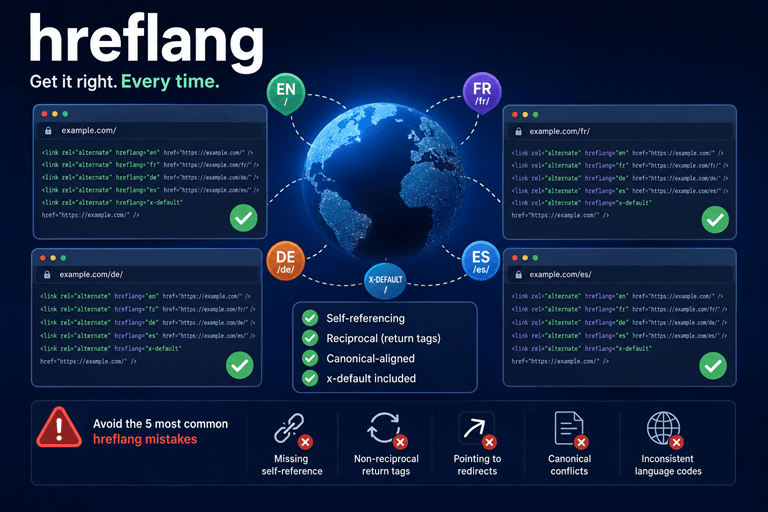
1. Missing self-referencing hreflang
The English page lists French and German versions, but doesn’t reference itself as the English version. Google ignores the entire hreflang cluster. Fix: every page must include a hreflang tag pointing to itself.
2. Non-reciprocal return tags
English page points to French page. French page doesn’t point back. Google sees this as broken and may discard the relationship. Fix: every reference must be mutual. The French page must list the English page as its English alternative.
3. Pointing hreflang to redirected URLs
Your English page declares the French version at https://example.com/fr/ but that URL 301-redirects to https://example.com/fr/home/. Google follows the redirect, but the hreflang signal is weakened — and in some cases ignored entirely.
Fix: hreflang must point to the final canonical URL, not to a redirect chain. Audit with a crawler that flags non-200 hreflang targets.
4. hreflang and canonical conflicts
Your French page has a canonical pointing to the English page (because someone copy-pasted the canonical tag). Google reads this as “the French page is just a duplicate of the English page” and the hreflang relationship gets ignored. Fix: every translated page must self-canonicalize. The French page’s canonical points to itself, not to the English original.
5. Mixing language and region codes inconsistently
Some pages declare hreflang="en", others declare hreflang="en-US". Google treats these as separate language clusters. Pick one strategy per language and stick with it across the entire site.
Production edge cases to plan for
Edge case 1: Region-only targeting (en-CA without en)
You have an English-Canadian variant of your page but no global English version. Don’t use hreflang="en" alone — Google may serve your Canadian page to UK users, which probably isn’t what you want. Instead, declare hreflang="en-CA" specifically and let x-default handle non-Canadian English speakers.
Edge case 2: Same content, different regions
US, UK, and Australian English versions of the same product page with identical text. This is fine — declare each region explicitly:
<link rel="alternate" hreflang="en-US" href="https://example.com/" />
<link rel="alternate" hreflang="en-GB" href="https://example.com/uk/" />
<link rel="alternate" hreflang="en-AU" href="https://example.com/au/" />
<link rel="alternate" hreflang="x-default" href="https://example.com/" />
Even when content is identical, regional hreflang variants are valuable for products with region-specific pricing, currency, or shipping.
Edge case 3: Mobile and desktop variants
If you have separate m. subdomain mobile pages, each mobile page needs its own hreflang declarations pointing to other mobile language variants. Don’t point a mobile French page to a desktop English page — Google considers this a broken cluster.
Edge case 4: Subdomains vs. subdirectories
Both work for hreflang. fr.example.com and example.com/fr/ are equally valid. The choice is operational (DNS, hosting, analytics) — not an SEO factor by itself. What matters is consistency: pick one structure and apply it across all languages.
Edge case 5: Pagination
Page 2 of your French blog index should declare hreflang to page 2 of your English blog index, not to page 1. Map equivalent pages to equivalent pages, including pagination, query parameters, and filters.
Edge case 6: 404 and 410 pages
If a translated version of a page doesn’t exist (yet), don’t declare hreflang for that language. Pointing hreflang to a 404 is worse than not declaring it at all — Google sees it as a broken relationship and may demote the entire cluster.
How to validate before going live
Use complementary checks because no single report proves that every URL pair is correct:
- Google Search Console. Submit the language sitemaps, inspect representative URLs with URL Inspection, and compare Page indexing and Performance data by language directory. The former International Targeting report is no longer available in the current Search Console interface.
- Screaming Frog. Crawls your entire site and reports non-reciprocal hreflang, missing return tags, broken hreflang URLs, and inconsistencies. The single best tool for pre-launch QA.
- Merkle’s hreflang tag testing tool. Free, browser-based, good for spot-checks during development.
Run crawler validation and representative URL checks before a major launch, then monitor Search Console after Google recrawls the pages.
How automated tools handle hreflang
If you’re using a website translation platform like ConveyThis, Weglot, or similar, hreflang generation should be automatic. The platform crawls your content, detects new pages, and inserts the correct hreflang tags on every translated version — including self-referencing tags, return tags, and x-default.
This is the strongest argument for using a translation platform over a manual translation pipeline. Manually maintaining hreflang across a 200-page site in 12 languages means tracking 31,200 tag relationships. Every new page adds 12 new relationships that must be added in 12 places. Manual maintenance breaks at scale.
If you’re using a platform and still seeing hreflang errors in Search Console, the cause is usually one of three things: a CDN caching layer that’s stripping headers, a CMS plugin that’s overwriting tags, or a redirect rule that’s interfering with the canonical structure. All three are fixable, but they require coordination between your translation platform, your hosting setup, and your CDN.
The bottom line
hreflang isn’t complicated. It’s verbose. The complexity comes from the volume of declarations and the fragility of any single missing tag. Get the foundations right — self-referencing, reciprocal, canonical-aligned, x-default present — and the rest is just maintenance.
Correct hreflang removes ambiguity about which equivalent URL is intended for a given language or region. Fix the basics first, then monitor impressions, clicks, and selected canonical URLs as Google recrawls the cluster.
About the author
Alex Buran, Founder of ConveyThis
Alex has spent the last decade building infrastructure for multilingual websites. He writes about localization, AI search, and the technical side of going global.
LinkedIn: https://www.linkedin.com/in/alexburan/
Tired of debugging hreflang manually? ConveyThis generates valid, reciprocal, self-referencing hreflang tags on every translated page automatically — including x-default and edge cases. See the API documentation












;fill-opacity:1;'%20d='M%2019.511719%2039.964844%20C%208.304688%2039.964844%200%2031.289062%200%2020.324219%20L%200%2020.230469%20C%200%209.363281%208.160156%200.46875%2019.847656%200.46875%20C%2027.023438%200.46875%2031.320312%202.878906%2034.847656%206.375%20L%2029.519531%2012.492188%20C%2026.59375%209.820312%2023.59375%208.179688%2019.800781%208.179688%20C%2013.390625%208.179688%208.761719%2013.53125%208.761719%2020.085938%20L%208.761719%2020.203125%20C%208.761719%2026.757812%2013.273438%2032.203125%2019.800781%2032.203125%20C%2024.144531%2032.203125%2026.808594%2030.46875%2029.808594%2027.722656%20L%2035.136719%2033.121094%20C%2031.199219%2037.335938%2026.855469%2039.964844%2019.511719%2039.964844%20'/%3e%3cpath%20style='%20stroke:none;fill-rule:nonzero;fill:rgb(26.274511%25,42.352942%25,94.901961%25);fill-opacity:1;'%20d='M%2035.878906%200.0351562%20L%2044.136719%200.0351562%20L%2044.136719%2039.867188%20L%2035.878906%2039.867188%20Z%20M%2035.878906%200.0351562%20'/%3e%3cpath%20style='%20stroke:none;fill-rule:nonzero;fill:rgb(26.274511%25,42.352942%25,94.901961%25);fill-opacity:1;'%20d='M%2059.472656%2016.15625%20C%2056.039062%2016.15625%2053.808594%2018.613281%2053.160156%2022.375%20L%2065.617188%2022.375%20C%2065.113281%2018.664062%2062.953125%2016.15625%2059.472656%2016.15625%20M%2073.535156%2027.578125%20L%2053.28125%2027.578125%20C%2054.097656%2031.335938%2056.710938%2033.3125%2060.40625%2033.3125%20C%2063.191406%2033.3125%2065.183594%2032.445312%2067.464844%2030.300781%20L%2072.191406%2034.492188%20C%2069.480469%2037.867188%2065.566406%2039.941406%2060.289062%2039.941406%20C%2051.527344%2039.941406%2045.070312%2033.769531%2045.070312%2024.832031%20L%2045.070312%2024.710938%20C%2045.070312%2016.347656%2051%209.480469%2059.472656%209.480469%20C%2069.191406%209.480469%2073.65625%2017.074219%2073.65625%2025.363281%20L%2073.65625%2025.457031%20C%2073.65625%2026.300781%2073.609375%2026.808594%2073.535156%2027.578125%20'/%3e%3cpath%20style='%20stroke:none;fill-rule:nonzero;fill:rgb(26.274511%25,42.352942%25,94.901961%25);fill-opacity:1;'%20d='M%2089.375%2039.796875%20L%2081.863281%2039.796875%20L%2070.390625%2010.324219%20L%2079.152344%2010.324219%20L%2085.679688%2029.914062%20L%2092.257812%2010.324219%20L%20100.847656%2010.324219%20Z%20M%2089.375%2039.796875%20'/%3e%3cpath%20style='%20stroke:none;fill-rule:nonzero;fill:rgb(26.274511%25,42.352942%25,94.901961%25);fill-opacity:1;'%20d='M%20111.550781%2016.15625%20C%20108.121094%2016.15625%20105.886719%2018.613281%20105.238281%2022.375%20L%20117.695312%2022.375%20C%20117.191406%2018.664062%20115.03125%2016.15625%20111.550781%2016.15625%20M%20125.617188%2027.578125%20L%20105.359375%2027.578125%20C%20106.175781%2031.335938%20108.792969%2033.3125%20112.488281%2033.3125%20C%20115.246094%2033.3125%20117.265625%2032.445312%20119.542969%2030.300781%20L%20124.273438%2034.492188%20C%20121.558594%2037.867188%20117.648438%2039.941406%20112.367188%2039.941406%20C%20103.609375%2039.941406%2097.152344%2033.769531%2097.152344%2024.832031%20L%2097.152344%2024.710938%20C%2097.152344%2016.347656%20103.078125%209.480469%20111.550781%209.480469%20C%20121.273438%209.480469%20125.734375%2017.074219%20125.734375%2025.363281%20L%20125.734375%2025.457031%20C%20125.734375%2026.300781%20125.6875%2026.808594%20125.617188%2027.578125%20'/%3e%3cpath%20style='%20stroke:none;fill-rule:nonzero;fill:rgb(26.274511%25,42.352942%25,94.901961%25);fill-opacity:1;'%20d='M%20143.566406%2018.757812%20C%20138.070312%2018.757812%20134.710938%2022.085938%20134.710938%2029.074219%20L%20134.710938%2039.867188%20L%20126.457031%2039.867188%20L%20126.457031%2010.613281%20L%20134.710938%2010.613281%20L%20134.710938%2016.519531%20C%20136.390625%2012.46875%20139.128906%209.867188%20144%2010.085938%20L%20144%2018.757812%20Z%20M%20143.566406%2018.757812%20'/%3e%3c/g%3e%3c/svg%3e)




;fill-opacity:1;'%20d='M%20144.558594%2039.894531%20L%20155.4375%209.839844%20C%20155.4375%209.839844%20147.28125%209.839844%20139.121094%2011.515625%20L%20128.867188%2039.894531%20Z%20M%20142.675781%201.78125%20L%20140.585938%207.539062%20C%20148.738281%205.863281%20156.902344%205.863281%20156.902344%205.863281%20L%20158.992188%200.105469%20C%20158.992188%200.105469%20150.832031%200.105469%20142.675781%201.78125%20M%2085.980469%2032.773438%20C%2090.898438%2033.71875%2095.914062%2034.136719%20101.039062%2034.136719%20C%20106.375%2034.136719%20110.140625%2032.984375%20110.554688%2029.320312%20C%20110.765625%2027.640625%20109.089844%2026.382812%20106.167969%2024.707031%20C%20102.816406%2022.824219%2099.894531%2021.878906%2096.960938%2019.886719%20C%2094.03125%2017.898438%2092.78125%2014.859375%2093.71875%2011.507812%20C%2094.871094%207.636719%2097.585938%205.4375%20101.664062%203.34375%20C%20106.480469%200.9375%20110.242188%20-0.0078125%20119.550781%20-0.0078125%20C%20125.40625%20-0.0078125%20131.054688%200.515625%20136.597656%201.667969%20L%20134.609375%207.113281%20C%20129.691406%206.167969%20124.675781%205.75%20119.550781%205.75%20C%20114.214844%205.75%20110.453125%206.90625%20110.035156%2010.570312%20C%20109.828125%2012.246094%20111.5%2013.503906%20114.425781%2015.179688%20C%20117.773438%2017.066406%20120.695312%2018.011719%20123.628906%2020%20C%20126.558594%2021.988281%20127.808594%2025.027344%20126.871094%2028.378906%20C%20125.71875%2032.253906%20123.003906%2034.449219%20118.925781%2036.542969%20C%20114.113281%2038.949219%20110.347656%2039.894531%20101.039062%2039.894531%20C%2095.183594%2039.894531%2089.535156%2039.375%2083.992188%2038.21875%20Z%20M%2062.34375%2039.894531%20L%2071.441406%2014.867188%20C%2074.476562%206.488281%2063.390625%209.527344%2060.875%2011.515625%20C%2058.890625%2012.984375%2055.332031%2016.441406%2054.078125%2020.105469%20L%2046.859375%2040%20L%2031.175781%2040%20L%2040.273438%2014.867188%20C%2043.308594%206.488281%2032.222656%209.527344%2029.710938%2011.515625%20C%2027.722656%2012.984375%2024.167969%2016.441406%2022.910156%2020.105469%20L%2015.691406%2040%20L%200.0078125%2040%20L%2014.441406%200.105469%20C%2019.464844%200.105469%2022.179688%201.257812%2024.375%203.457031%20C%2025.207031%204.289062%2025.734375%205.339844%2026.046875%206.496094%20C%2028.980469%204.714844%2031.589844%203.351562%2033.371094%202.726562%20C%2036.613281%201.46875%2040.691406%200.105469%2045.714844%200.105469%20C%2050.734375%200.105469%2053.453125%201.257812%2055.644531%203.457031%20C%2056.480469%204.289062%2057.007812%205.339844%2057.320312%206.496094%20C%2060.25%204.714844%2062.863281%203.351562%2064.640625%202.726562%20C%2067.886719%201.46875%2071.964844%200.113281%2076.984375%200.113281%20C%2082.007812%200.113281%2084.722656%201.265625%2086.917969%203.464844%20C%2089.21875%205.660156%2089.113281%209.742188%2088.28125%2012.050781%20L%2078.027344%2039.902344%20L%2062.34375%2039.902344%20Z%20M%2062.34375%2039.894531%20'/%3e%3c/g%3e%3c/svg%3e)

;fill-opacity:1;'%20d='M%202.453125%209.882812%20L%202.453125%2012.851562%20L%207.304688%2012.851562%20L%2016.800781%2030.734375%20L%2028.488281%2030.734375%20L%2037.980469%2012.824219%20L%2042.832031%2012.792969%20L%2042.84375%209.882812%20L%2028.328125%209.882812%20L%2028.328125%2012.804688%20L%2032.195312%2012.804688%20L%2025.488281%2025.515625%20L%2018.234375%2012.847656%20L%2023.527344%2012.824219%20L%2023.515625%209.882812%20Z%20M%2096.097656%209.882812%20L%2096.097656%2012.851562%20L%20100.949219%2012.851562%20L%20110.445312%2030.734375%20L%20122.128906%2030.734375%20L%20131.625%2012.824219%20L%20136.476562%2012.792969%20L%20136.484375%209.882812%20L%20121.972656%209.882812%20L%20121.972656%2012.804688%20L%20125.835938%2012.804688%20L%20119.132812%2025.515625%20L%20111.878906%2012.847656%20L%20117.167969%2012.824219%20L%20117.160156%209.882812%20Z%20M%2072.222656%209.882812%20L%2072.222656%2012.851562%20L%2077.078125%2012.851562%20L%2077.082031%2027.453125%20L%2071.96875%2027.453125%20L%2071.96875%2030.707031%20L%2077.085938%2030.734375%20L%20101.3125%2030.734375%20L%20101.3125%2021.027344%20L%2098.15625%2021.027344%20C%2097.984375%2026.167969%2093.542969%2027.457031%2091.675781%2027.457031%20C%2089.960938%2027.457031%2086.640625%2027.453125%2086.640625%2027.453125%20L%2086.640625%2012.847656%20L%2091.417969%2012.824219%20L%2091.410156%209.882812%20Z%20M%2055.890625%209.285156%20C%2047.644531%209.285156%2040.960938%2014.214844%2040.960938%2020.292969%20C%2040.960938%2026.375%2047.644531%2031.304688%2055.890625%2031.304688%20C%2064.136719%2031.304688%2070.824219%2026.375%2070.824219%2020.292969%20C%2070.824219%2014.214844%2064.136719%209.285156%2055.890625%209.285156%20Z%20M%2055.675781%2028.0625%20C%2052.769531%2028.0625%2050.414062%2024.566406%2050.414062%2020.25%20C%2050.414062%2015.933594%2052.769531%2012.4375%2055.675781%2012.4375%20C%2058.582031%2012.4375%2060.941406%2015.933594%2060.941406%2020.25%20C%2060.941406%2024.566406%2058.582031%2028.0625%2055.675781%2028.0625%20Z%20M%20149.539062%208.921875%20C%20141.289062%208.921875%20134.605469%2013.933594%20134.605469%2020.113281%20C%20134.605469%2026.292969%20141.289062%2031.300781%20149.539062%2031.300781%20C%20157.78125%2031.300781%20164.46875%2026.292969%20164.46875%2020.113281%20C%20164.46875%2013.933594%20157.78125%208.921875%20149.539062%208.921875%20Z%20M%20149.324219%2028.007812%20C%20146.417969%2028.007812%20144.0625%2024.453125%20144.0625%2020.066406%20C%20144.0625%2015.679688%20146.417969%2012.125%20149.324219%2012.125%20C%20152.230469%2012.125%20154.585938%2015.679688%20154.585938%2020.066406%20C%20154.585938%2024.453125%20152.230469%2028.007812%20149.324219%2028.007812%20Z%20M%20149.324219%2028.007812%20'/%3e%3c/g%3e%3c/svg%3e)